



A clothing shop with eight employees, a pharmacy with two shifts, a small office in a residential building: none of them needs attendance software, a server or a network cable to a wall clock. They need a device that records who came and when, and a way to hand the owner an Excel sheet at the end of the month. That is the job of the ZKTeco LX15 and the ZKTeco LX17.
How the LX series works
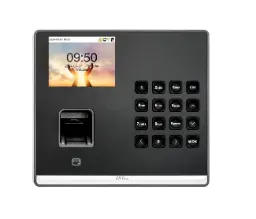
Both models are standalone fingerprint time attendance terminals. Their key feature is SSR (Self-Service Recorder): the attendance report is generated inside the device and exported to a USB flash drive as an Excel file. There is no network port; communication is USB Host/Client only. The owner, or the accountant, plugs in a flash drive, takes the file and opens it on any computer.
ZKTeco describes the series as suited to small chain stores, and notes that employee information can be edited in Excel format. In practice, you prepare the employee names in the sheet, load them back to the device, and the monthly report shows names rather than numbers.
Specifications
According to the manufacturer data published on our product pages, the two models share the same specification:
| Item | LX15 | LX17 |
|---|---|---|
| Type | Fingerprint time attendance terminal | Fingerprint time attendance terminal |
| Verification | Fingerprint, password | Fingerprint, password |
| Algorithm | ZKFinger VX 13.0 (default) or VX 10.0 | ZKFinger VX 13.0 (default) or VX 10.0 |
| Users | 500 | 500 |
| Fingerprints | 500 | 500 |
| Transactions | 50,000 | 50,000 |
| Display | 2.8" TFT | 2.8" TFT |
| Communication | USB Host/Client | USB Host/Client |
| Reports | Built-in SSR Excel report via USB | Built-in SSR Excel report via USB |
| Power supply | 5V 800mA | 5V 800mA |
| Dimensions | 185 x 140 x 30 mm | 185 x 140 x 30 mm |
Standard functions on both: scheduled bell, SSR recorder, 9-digit user ID, T9 input, record checking, multiple languages and DST.
So what is the difference between LX15 and LX17?
Honestly, the published technical data does not show one: capacities, algorithm, communication, power and dimensions are identical. We would rather say that than invent a difference. In practice, choose based on availability and the look the client prefers, and ask our sales team to confirm the current stock model. What matters more is whether the LX series fits the site at all, which the next sections cover.
Where the LX15 and LX17 fit well
- Shops and boutiques with a small, stable team and an owner who checks attendance once a month.
- Pharmacies and clinics with two shifts, where the scheduled bell and the Excel report are enough.
- Small offices in apartments or administrative buildings where running a network cable to the entrance is not practical.
- Branches of a small chain where each branch manager sends the Excel file to head office.
The 500-user capacity is far more than a shop needs, and 50,000 transactions give a wide margin. As a rough estimate, 15 employees punching in and out every working day produce well under 1,000 records a month.
On the other hand, we would not use the LX series for a factory with rough-handed workers, a company that wants to follow several branches live from one office, or a site that needs the device to open a door. There, the simplicity costs you later in complaints and manual follow-up; start with a networked device instead.
Need technical advice before you buy?
Do Link's sales team helps you choose the right equipment for your site and budget, with special wholesale and project pricing.
Contact the sales team WhatsApp Call us 01098280784 Request a quote
Installation notes
- Power: 5V 800mA through its adapter. Place the device near a socket; there is no battery listed, so in areas with frequent power cuts consider a small UPS for the socket.
- Location: indoors, at a comfortable hand height, away from rain, dust and direct sun.
- Enrollment: enroll two fingers per employee, and a password for anyone whose fingerprint reads poorly.
- Flash drive: keep one dedicated USB flash drive for the device and test the export on the first day, so the owner knows the routine.
- Names in Excel: prepare the employee list in the Excel sheet before you leave the site, so the first report already shows names.
A simple monthly routine for the owner
A standalone device like the LX15 or LX17 works well when the owner keeps one small habit:
- Last working day of the month: export the SSR report to the flash drive and keep a copy on the computer and another by email or cloud storage.
- New employee: enroll the fingerprint on day one, add the name to the Excel sheet and load it back to the device.
- Employee leaves: delete the user so the ID does not get mixed up with a new hire later.
- Daylight saving changes: check the DST setting so the report does not show a false hour of lateness.
When to step up to the MB20
The LX series is simple on purpose. Move to the ZKTeco MB20 when any of these apply:
- You want reports on a PC over the network without walking to the device with a flash drive. The MB20 has TCP/IP 10M/100M and works with ZKBio Time, ZKBio Time.Net, ZKBio CVAccess (T&A module) and Zlink Assistant.
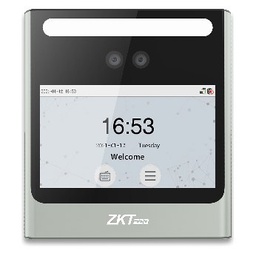
- Some staff have poor fingerprints. The MB20 adds face recognition (200 faces, optional 500) and optional cards.
- You want the device to open a door. The MB20 has one relay with lock, sensor and exit button connections. The LX15 and LX17 do not list access control.
- Power cuts matter. ZKTeco lists an optional 5V 1900mAh UPS for the MB20 with standby up to 3 hours.
If the only need is network connectivity with fingerprints, a middle step such as the K14 PRO offers TCP/IP and 3,000 fingerprints. All options are in the ZKTeco time attendance category, and more about the brand is on our ZKTeco page.
Buying through Do Link
Do Link is an authorized ZKTeco distributor in Egypt, supplying original devices with a one-year warranty and technical support before and after the sale. Shops and dealers can order at wholesale prices with delivery to all governorates. To confirm the available model, contact the sales team or WhatsApp 01098280784.
Recommended products from Do Link


Get a quote from Do Link
Send us your site details and the number of points you need, and Do Link's sales team will reply with suitable models and pricing. Or visit one of our three branches in Bab El Louk, Cairo.
Contact the sales team WhatsApp Call us 01098280784 Request a quote
About Do Link
Do Link for Security Systems is the official Platinum Distributor of Uniview in Egypt, and we supply Hikvision, Dahua, ZKTeco, TP-Link and other global brands for CCTV, networking, intercom and access control. Our products are original with a one-year warranty, pre- and post-sale technical support, and delivery to all Egyptian governorates.
Frequently asked questions
Do the LX15 and LX17 connect to a network?
No. Communication is USB Host/Client only. Reports are exported to a USB flash drive as Excel files through the built-in SSR.
What is the difference between the LX15 and the LX17?
The published technical data is identical: 500 users, 500 fingerprints, 50,000 transactions, USB and SSR. Choose based on availability and appearance.
Do I need software on a computer?
No. The SSR report is created inside the device and opened in Excel on any computer.
Can the LX15 or LX17 open a door?
Access control is not listed for these models. For one door, look at the ZKTeco MB20, which has a relay for a lock and an exit button.
What if an employee's fingerprint does not read well?
Both models also accept a password. If many staff have this problem, a face and fingerprint device such as the MB20 is the better fit.