



A checkout counter has three pieces of hardware around the POS software: a barcode scanner, a receipt printer and a cash drawer. When one of them is the wrong type, the cashier feels it all day: a scanner that cannot read the QR code on a customer's phone, a printer that prints Arabic as question marks, a drawer that does not open when the sale is closed. This guide walks through the ZKTeco POS line we carry and how to put a working counter together.
Step 1: the barcode scanner
The first question is which codes you need to read. A 1D scanner reads ordinary linear barcodes (EAN-13, UPC, Code 128 and similar). A 2D scanner also reads QR codes, Data Matrix and PDF417. The second question is how the cashier works: holding the scanner, putting items under it, or walking around with it.
ZKB102S: 1D, wired, everyday
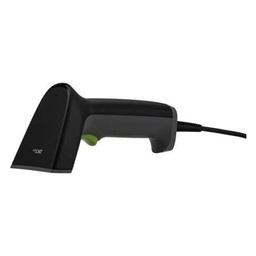
The ZKB102S reads common 1D barcodes over USB (RS-232 optional) in manual trigger mode. ZKTeco notes it reads codes on LCD and OLED phone screens as well as paper, and handles several barcodes close together. Its listed reading range for EAN-13 13 mil is 3 cm to 30 cm. It suits groceries, mobile accessory shops and bookshops where products carry standard barcodes.
ZKB201S: 1D and 2D in the hand
The ZKB201S adds 2D decoding: QR Code, Micro QR, Data Matrix, PDF417, Aztec and more, alongside the same 1D codes. It uses a 640 x 480 image sensor with white LED illumination and a red aiming pattern, and ZKTeco says it reads high-density, dirty and damaged barcodes. Choose it if customers show QR codes on their phones, or if your products carry 2D codes.
ZKB209: hands-free on the counter
The ZKB209 is a presentation scanner: it sits on the counter and scans automatically when an item passes in front of it, with a button for manual mode when needed. It reads both 1D and 2D codes, has a 1024 x 1024 sensor, a scan range of 0 to 280 mm (EAN-13 13 mil) and a motion tolerance of 4 m/s. It connects by USB (driver-free) or RS232 with a 2 m cable, and is designed to survive multiple 1.5 m drops onto concrete. For a busy supermarket or pharmacy counter, it saves the cashier from picking up the scanner for every item.
ZKB103S: wireless for large or heavy items
The ZKB103S is a 1D laser scanner with 2.4GHz wireless (range up to 60 m; Bluetooth with 15 m range is optional). It has a 2000 mAh battery rated for at least 15 hours of operation per charge, and a storage mode that keeps more than 20,000 barcodes when out of range. That suits building materials shops, warehouses and stock counts, where carrying the product to the counter is not practical. Note it reads 1D codes only.
| Scanner | Codes | Scan mode | Connection | EAN-13 13 mil range |
|---|---|---|---|---|
| ZKB102S | 1D | Manual | USB (RS-232 optional) | 3 to 30 cm |
| ZKB201S | 1D and 2D | Manual | USB (RS232 optional) | 3 to 25 cm |
| ZKB209 | 1D and 2D | Automatic, manual button | USB, RS232; 2 m cable | 0 to 280 mm |
| ZKB103S | 1D | Manual | 2.4GHz wireless (Bluetooth optional) | 3 to 30 cm |
Step 2: the receipt printer
ZKP8012: the counter workhorse
The ZKP8012 is a direct thermal printer for 80 mm rolls (72 mm print width) at 230 mm/s. It has USB and LAN (USB + RS232 optional), a partial auto cutter rated for 1 million cuts, a print head life of 100 km, and an Arabic code page in its character sets. It prints 1D barcodes plus QR Code and PDF417, and has a cash drawer port at DC 24V/1A.
ZKP8016: faster, for busy counters
The ZKP8016 also prints on 80 mm rolls with a 72 mm print width, has an auto cutter, USB + LAN, an RJ11 cash drawer port at DC 24V, and character sets that include Arabic. ZKTeco quotes a print speed of 300 mm/sec and ESC/POS compatibility. Where queues build up, at a supermarket, a busy café or a takeaway, the extra speed helps.
ZKP8003: portable, battery-powered
The ZKP8003 is a different kind of printer: portable, with a built-in 7.4V 2000 mAh rechargeable lithium battery, printing at 90 mm/s with QR and barcode support. It is not meant for a fixed counter with a cash drawer; it suits delivery staff, field sales, exhibitions and market stalls where there is no desk and no socket.
Step 3: the cash drawer
The ZKC0508 is a metal cash drawer with 5 bill and 8 coin compartments, a removable coin box, a 3-position lock and a standard wire clip. The housing is cold-formed steel with an ABS plastic drawer; it measures 410 x 415 x 100 mm and weighs 5.8 kg net. The solenoid works at 12V or 24V, and it connects with an RJ cable directly to the receipt printer.
The ZKC0508E has the same listed compartments, coin box, lock, 12V/24V solenoid and printer interface. The published data does not list a further difference, so ask our sales team which one fits your counter and is currently available.
How the drawer opens
In the usual setup the drawer does not connect to the computer. It plugs into the printer's cash drawer port, and the POS software tells the printer to send an opening pulse when a sale is completed. Two things to check: the drawer voltage must match the printer's drawer port (both the ZKP8012 and ZKP8016 list DC 24V), and the "open drawer" option must be enabled in the POS software settings.
Need technical advice before you buy?
Do Link's sales team helps you choose the right equipment for your site and budget, with special wholesale and project pricing.
Contact the sales team WhatsApp Call us 01098280784 Request a quote
Ready-made combinations
- Grocery or small shop: ZKB102S + ZKP8012 + ZKC0508.
- Pharmacy or shop that needs QR / 2D codes: ZKB201S + ZKP8012 + ZKC0508.
- Supermarket or busy counter: ZKB209 + ZKP8016 + ZKC0508 or ZKC0508E.
- Warehouse sales or building materials: ZKB103S + ZKP8012 + cash drawer at the counter.
- Delivery and field sales: ZKP8003 with the salesperson's device.
Setup checklist
- Confirm the POS software supports the printer over USB or network, and test Arabic item names on the first receipt.
- For a network printer, give it a fixed IP address so the software does not lose it after a router restart.
- Set the scanner suffix (usually Enter) as the POS software expects, then scan a few real products before the shop opens.
- Run the drawer cable from the printer, and test the drawer kick on a trial sale.
- Keep spare 80 mm thermal rolls at the counter; most "printer faults" on day one are an empty or reversed roll.
All items are in the ZKTeco point of sale category, and more about the brand is on our ZKTeco page.
Buying through Do Link
Do Link is an authorized ZKTeco distributor in Egypt, supplying original POS hardware with a one-year warranty and technical support before and after the sale. Shops and dealers get wholesale prices, chains and projects get project prices, and we deliver to all governorates. To build a counter set, contact the sales team or WhatsApp 01098280784.
Recommended products from Do Link


Get a quote from Do Link
Send us your site details and the number of points you need, and Do Link's sales team will reply with suitable models and pricing. Or visit one of our three branches in Bab El Louk, Cairo.
Contact the sales team WhatsApp Call us 01098280784 Request a quote
About Do Link
Do Link for Security Systems is the official Platinum Distributor of Uniview in Egypt, and we supply Hikvision, Dahua, ZKTeco, TP-Link and other global brands for CCTV, networking, intercom and access control. Our products are original with a one-year warranty, pre- and post-sale technical support, and delivery to all Egyptian governorates.
Frequently asked questions
Which ZKTeco scanner reads QR codes?
The ZKB201S and ZKB209 read both 1D and 2D codes, including QR Code. The ZKB102S and ZKB103S read 1D barcodes only.
Can the ZKTeco receipt printers print Arabic?
Yes. The ZKP8012 lists an Arabic code page and the ZKP8016 lists character sets that include Arabic. Your POS software must also support it.
How does the cash drawer open?
The ZKC0508 connects directly to the receipt printer's drawer port, and the POS software triggers it when the sale is completed. Match the drawer voltage to the printer port (24V on ZKP8012 and ZKP8016).
Is there a wireless barcode scanner?
Yes, the ZKB103S uses 2.4GHz wireless with up to 60 m range, a battery rated for at least 15 hours, and a storage mode for more than 20,000 barcodes.
Which printer works without a power socket?
The ZKP8003 is a portable printer with a built-in 7.4V 2000 mAh rechargeable lithium battery.
What paper do the counter printers use?
The ZKP8012 and ZKP8016 use 80 mm thermal rolls with a 72 mm print width.