



An hour without internet at home is annoying. For a company running cloud accounting, a pharmacy taking card payments, or a site owner who needs to check cameras remotely, the same hour costs real money. When the fixed line fails, it does not help that the provider will fix it in two days.
For most small and mid-size businesses in Egypt, the practical answer is a mobile backup line with a router that switches over automatically.
Your backup options
| Option | Switchover | Pros | Limits |
|---|---|---|---|
| Separate 4G/5G router on the second WAN of a multi-WAN router | Automatic | Flexible placement and antenna, easy to swap either box | Two devices instead of one |
| One router with a SIM slot plus a fixed-line WAN | Automatic, if the model supports it | Single box, simple install | Router location may not suit mobile signal |
| Battery MiFi | Usually manual | Works through power cuts, portable | Limited clients, often modest speed |
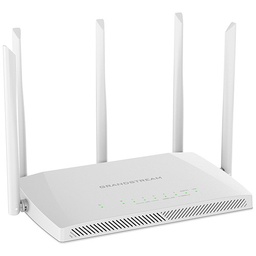
For an office or shop that needs real continuity, we prefer the first: a multi-WAN business router such as the Grandstream routers, with the fixed line on WAN1 and a 4G router on WAN2. MiFi devices suit small shops, technicians who need internet on site, or a last-resort emergency kit.
How automatic failover works
The router monitors the primary line and moves traffic to the backup when it decides the primary is down. How it decides matters:
- Port state only is not enough. The fixed line can stay up to the router while the internet is down at the provider.
- Ping or DNS health checks to external hosts are the right method. Use at least two reliable targets so one server going quiet does not trigger a needless switch.
Open sessions drop on switchover: a VoIP call, a VPN tunnel, a large download. Devices usually reconnect within seconds to a minute depending on check settings, but do not expect the invisible handover of large enterprise networks. Set failback sensibly too: let the primary stay stable for a few minutes before returning, so the router does not bounce between lines.
Some routers also load-balance across both lines. Useful with a large data plan, but with limited mobile bundles we prefer to keep the backup as backup only.
Work out data use before it runs out
The expensive mistake: failover works perfectly, then the bundle is gone in two hours because every device started OS updates and cloud backups the moment internet returned. A small office example:
- Assumption: 10 staff averaging 150 MB per hour for email, cloud apps and browsing, over a 4-hour outage: 10 × 150 × 4 = 6,000 MB, about 6 GB.
- Remote camera viewing on a 512 kbps substream for one hour: 512,000 × 3,600 ÷ 8 ≈ 230 MB.
- The same hour on a 4 Mbps main stream: 4,000,000 × 3,600 ÷ 8 = 1.8 GB.
Normal office use fits a reasonable bundle; watching main streams over the backup does not. Use policy routing so only essential traffic takes the backup line, block OS updates and large sync jobs on it where possible, and view cameras on the substream.
Need technical advice before you buy?
Do Link's sales team helps you choose the right equipment for your site and budget, with special wholesale and project pricing.
Contact the sales team WhatsApp Call us 01098280784 Request a quote
Signal and antenna: placement beats hardware
An excellent 4G router in a desk drawer inside a concrete building will perform poorly. Open the router's status page and watch the readings. Common RSRP guidelines:
- Better than -80 dBm: excellent.
- -80 to -90 dBm: good.
- -90 to -100 dBm: fair, speed may fluctuate.
- Weaker than -100 dBm: poor; move it or add an external antenna.
Signal quality (SINR) matters as much as strength; a strong signal with heavy interference is still slow. Try spots near windows and on higher floors, and test SIMs from more than one operator, since the best network changes from street to street. If you need an external antenna, pick a two-port MIMO model matching the router's connectors and keep the cable short.
5G networks have launched in Egypt only recently and coverage is still limited to certain areas, so confirm real coverage at your site before paying for a 5G router. A good 4G router with the right antenna is often better value. On paper, LTE Cat4 reaches 150 Mbps down and Cat6 300 Mbps; real speed depends on signal and cell load.
Things specific to Egypt
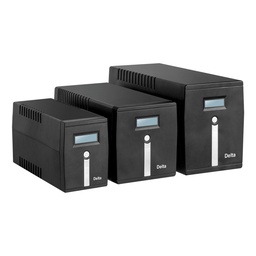
Power cuts: a backup line is useless if the router is off. Put the main router, the 4G router and the fixed-line modem on a suitable UPS; their draw is small, so even a modest unit gives good runtime. Fixed-line equipment outside your building may also go down in an area outage, which is exactly when mobile backup earns its keep.
A second fixed line is not always real backup: in many areas, ADSL or VDSL from a second provider runs over the same copper infrastructure, so a cable or cabinet fault takes both down. Real backup arrives by a different path, which is what mobile provides.
Public IP and remote access: mobile connections usually sit behind carrier-grade NAT, so port forwarding will not work. Camera viewing or server access that relies on port forwarding stops while you are on backup. P2P cloud services in camera apps, or a VPN initiated from inside your network to an outside server, still work.
Our advice: test the backup monthly by unplugging the primary for a few minutes, and confirm the switchover happens and the bundle is still active. Most backup lines that fail on the day fail because of an expired bundle or a SIM nobody topped up for months.
Quick setup checklist
- Test signal in several spots with SIMs from more than one operator.
- Give the 4G router a different subnet from the LAN to avoid conflicts on WAN2.
- Enable ping checks to two external hosts on the primary, with sensible failover and failback timers.
- Route only essential traffic over the backup.
- Note the SIM details and renewal date, and make one person responsible for them.
How Do Link can help
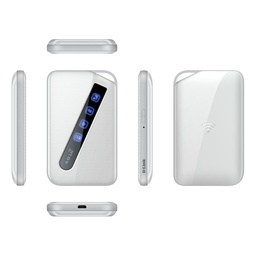
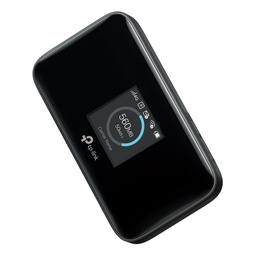
Do Link stocks D-Link 4G routers, TP-Link MiFi and modem routers, multi-WAN business routers from Grandstream, Huawei and others, and Delta and APC/Schneider UPS units to keep it all running through power cuts. Our technical team can help you choose the right combination and configure failover and routing policies. Products are original with a one-year warranty and delivered to every governorate.
Tell us your user count, type of work and current line through our contact page and we will suggest the right setup, or browse our networking solutions for offices and shops.
Recommended products from Do Link
Get a quote from Do Link
Send us your site details and the number of points you need, and Do Link's sales team will reply with suitable models and pricing. Or visit one of our three branches in Bab El Louk, Cairo.
Contact the sales team WhatsApp Call us 01098280784 Request a quote
About Do Link
Do Link for Security Systems is the official Platinum Distributor of Uniview in Egypt, and we supply Hikvision, Dahua, ZKTeco, TP-Link and other global brands for CCTV, networking, intercom and access control. Our products are original with a one-year warranty, pre- and post-sale technical support, and delivery to all Egyptian governorates.
Frequently asked questions
Is a 4G router on its own enough as a backup?
It is if you are willing to switch manually during an outage by moving a cable or joining a different network. For automatic switchover with nobody on site, you need a multi-WAN router with both the fixed line and the 4G router connected, or a single router supporting a SIM and fixed WAN with failover.
Why does remote camera viewing stop on the mobile backup?
If viewing relies on port forwarding and a public IP, it stops because mobile connections usually sit behind carrier-grade NAT. Use the P2P cloud service in the camera app, or a VPN initiated from inside your network to an external server. Neither needs a public IP address on the connection.
How much data should the backup bundle have?
Multiply users by average hourly use and expected outage length. For example, 10 staff on normal office work at an assumed 150 MB per person per hour use about 6 GB in a 4-hour outage. Add margin, block updates and large syncs on the backup line, and view cameras on the substream.
Should I buy a 5G router instead of 4G?
It depends on coverage at your exact site. 5G in Egypt has launched only recently and coverage is still limited to certain areas. If it is available with a good signal where you are, you may gain speed; otherwise a good 4G router with the right placement or an external antenna usually offers better value as a backup.
Where should the 4G router go in the office?
Wherever the router's status page shows the best RSRP and SINR readings, usually near a window or on a higher floor, away from thick concrete walls and metal surfaces. Try several spots and note the readings at each, and test SIMs from more than one operator. If the signal stays weaker than -100 dBm, consider an external antenna.